
 Windows App · 2026 · Fan tool for Heroes of the Storm
Hero Stats.
The stats your profile page doesn’t show.
The profile page in Heroes of the Storm shows you a win rate per hero – and that’s about it. Hero Stats reads your own replays and shows you the rest: which hero works on which map, who you win with and who beats you, your draft, your talents and when you play best.
One win rate per hero.
That’s it?
Hundreds of matches – and the profile page shows me one number per hero. Not which map I should pick Deckard on, not who I win with, not when I’d better stop for the night.
Every replay on your PC knows so much more: the draft, every talent, the whole score screen, the awards, who was on your team. Hero Stats reads them all and turns them into the numbers I always wanted.
It’s the third tool in the family: Hero Finder helps you draft, Hero Banlist helps you remember – and Hero Stats shows you what actually works. Like its siblings, it was written together with Claude – another step on my mission to do good and cool things with AI. 🙂
Your replays.
Every number.
Hero Stats reads every replay on your PC – Storm League, Quick Match, ARAM and more, from all your accounts – and keeps up by itself while you play. Filter everything by mode, period and account.
Hero × map
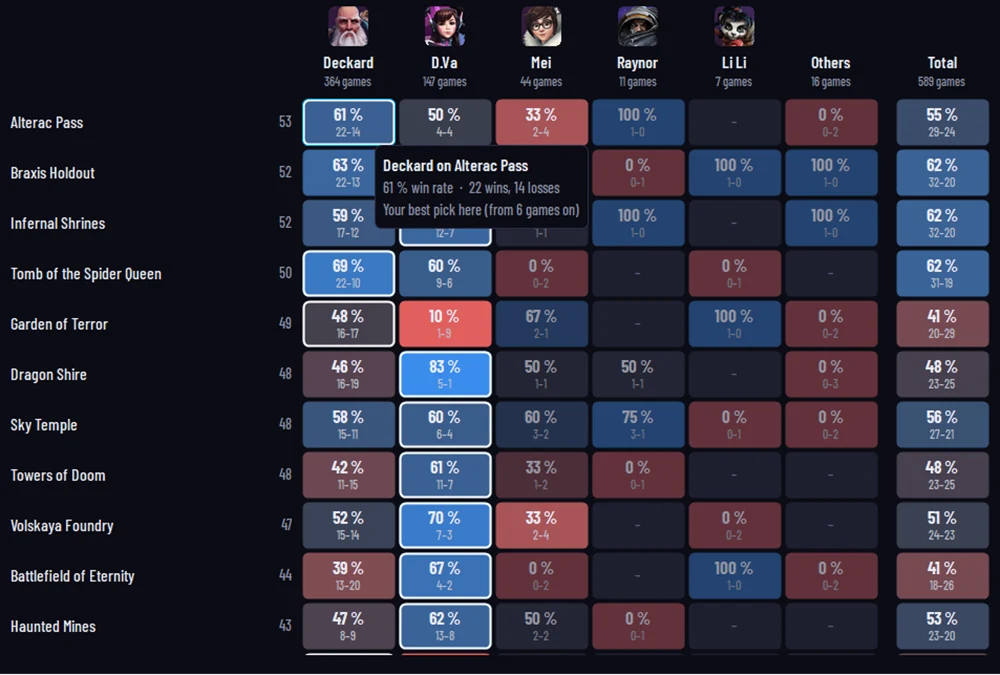
MatrixYour win rate for every hero on every map. Your best pick per map gets a white frame.
Allies & enemies
Synergy & countersWho you win with on your team and who beats you – for any of your heroes, as a list or a matrix.
Your heroes
TalentsWin rate, KDA, damage, healing and MVP rate per hero – plus pick and win rate for every talent.
Draft
First pick & bansFirst pick vs. second pick, your pick position, your team’s first picks and the bans of both teams.
When you play
HeatmapsWeekday × hour: when you play most – and when you actually win.
Records & awards
Personal bestsMost takedowns, damage, healing, fastest win – and every end-of-match award you collected.

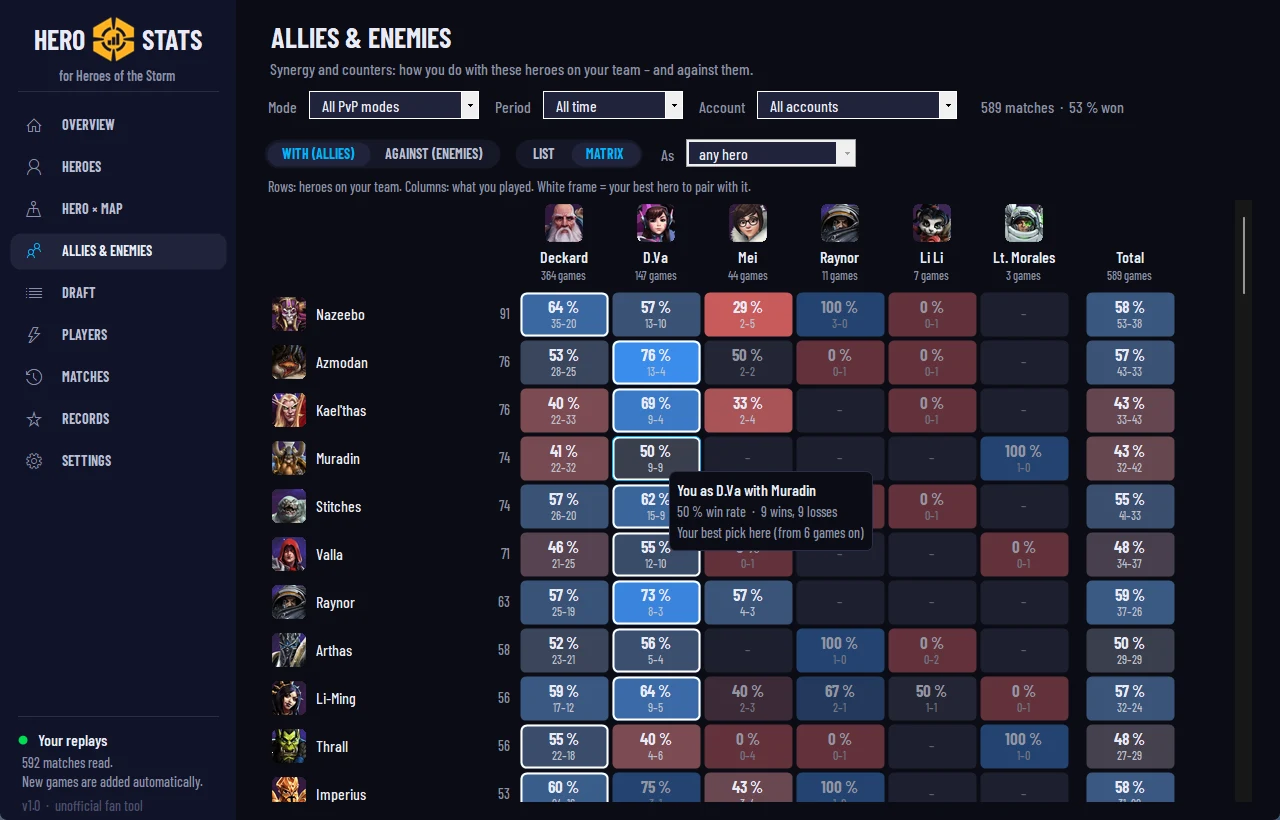
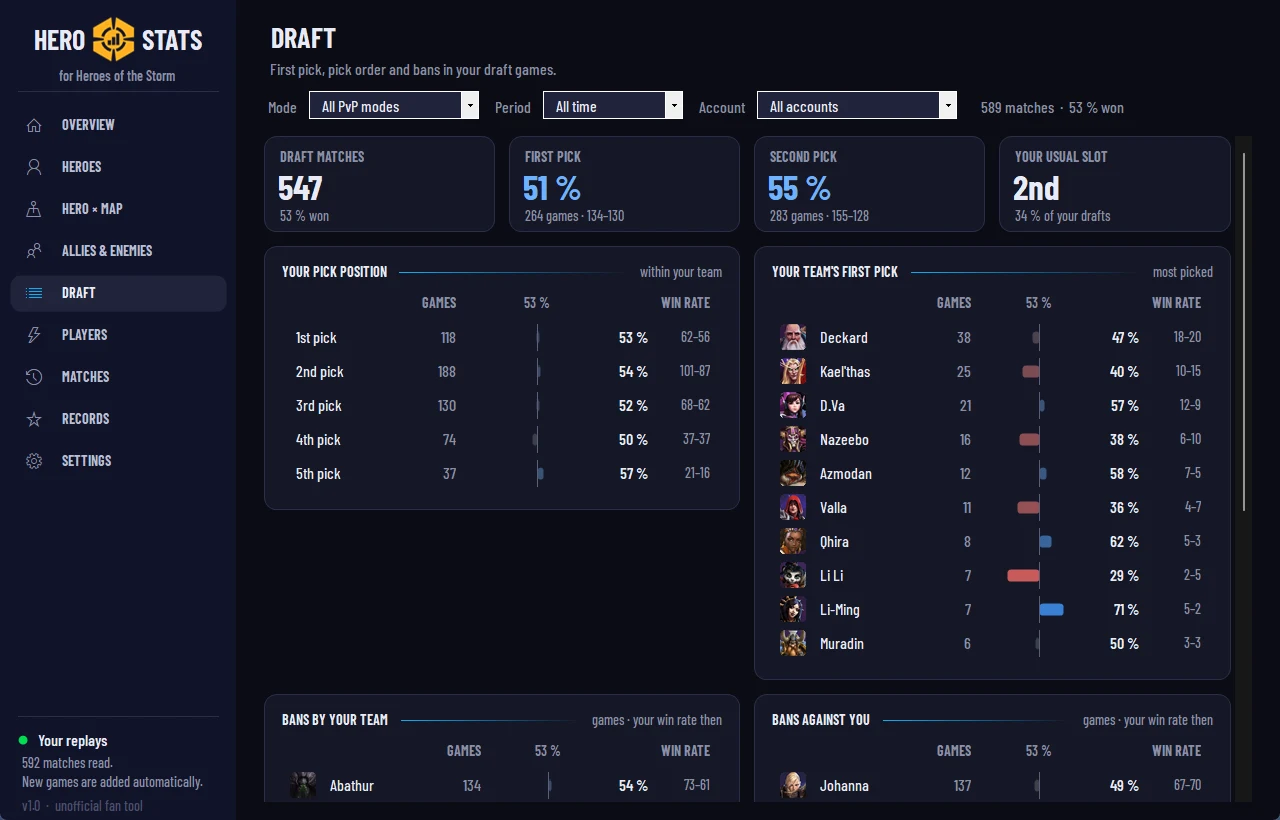
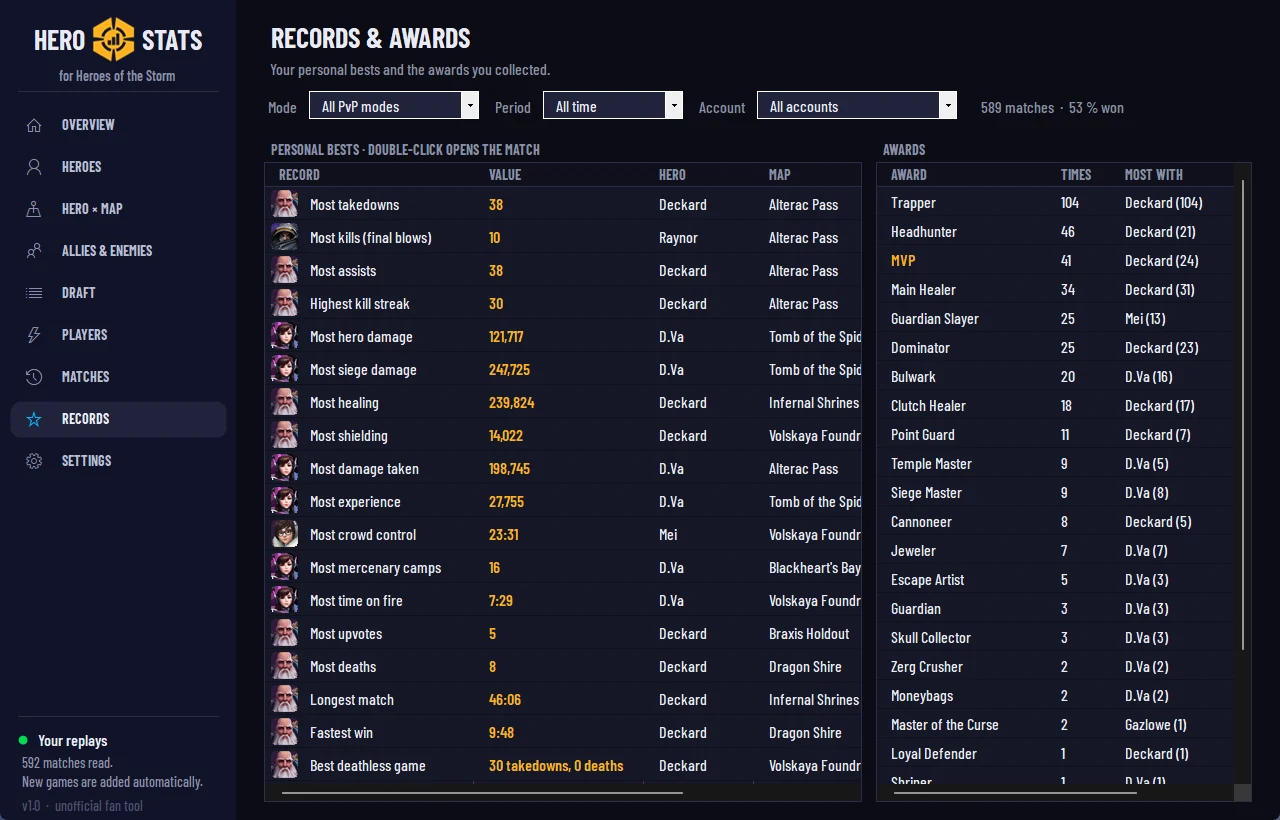
The screenshots show my own stats – from my own replays.
Weekday × hour.
When do you win?
Two heatmaps show when you play the most – and when you actually win. Maybe your evening games are your best ones. Maybe it’s time to stop after midnight.
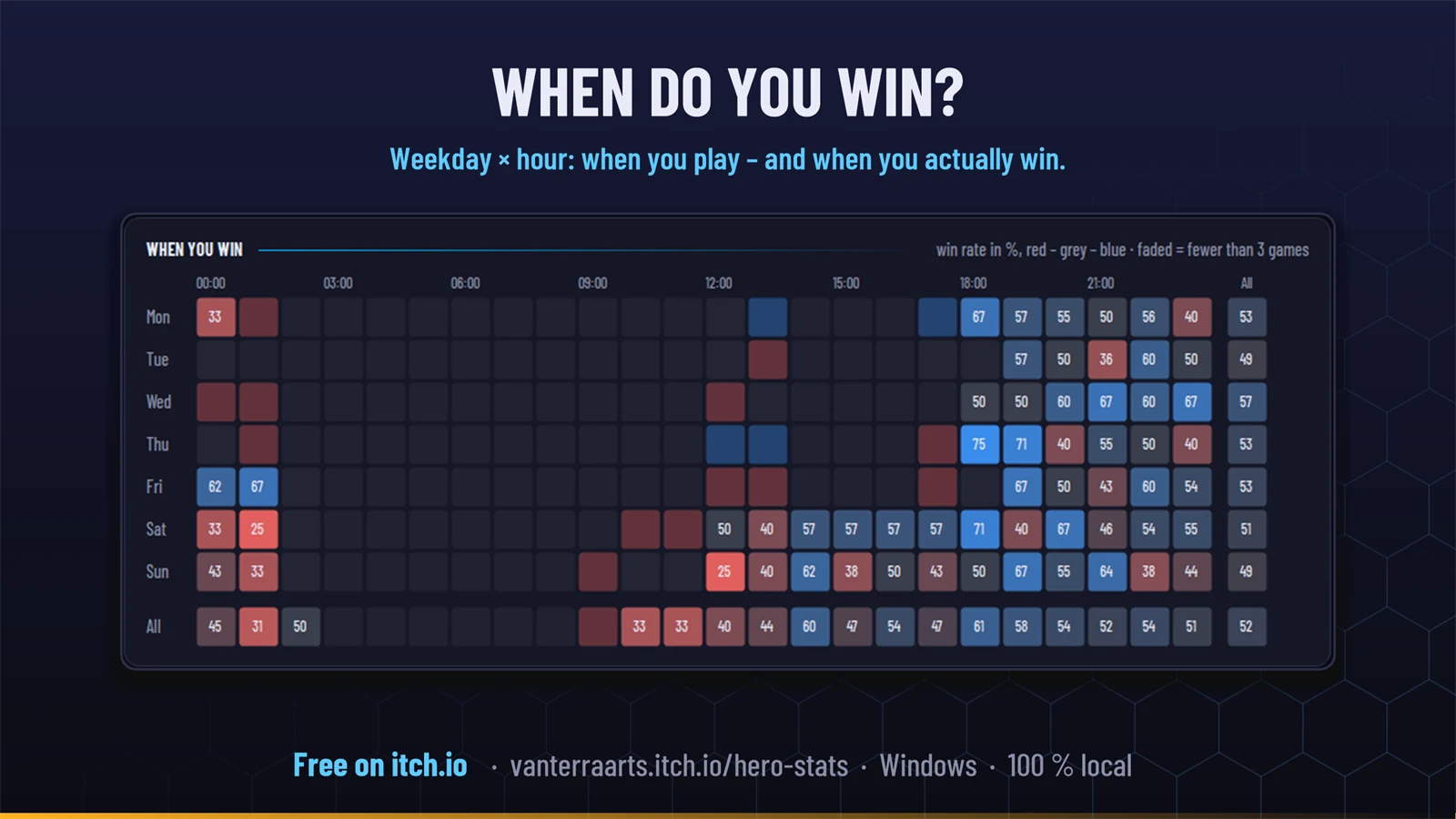
Colour-blind friendly by default: the activity heatmap carries its meaning in brightness, not only in colour. And if your PC’s clock didn’t match where you were, set your home time zone and your trips – the hours follow.
Your matches.
Your PC.
Hero Stats knows exactly what your replays know – nothing more, nothing less. And it tells you when a number is too small to mean much.
- Your own data. Not a tier list from the internet: your win rate, with your heroes, on your maps, against the heroes you met.
- Small numbers, faded. Three games are mostly luck. Win rates from only a few games are drawn faded and never called “best”.
- All modes, all accounts. Storm League, Quick Match, ARAM, Unranked and more – filter by mode, period and account.
- Any client language. Heroes are recognised by their internal game ID, so replays from a German or a Korean client fit together.
- 100 % local. It only reads your replay files. No account, no upload, no server, no tracking.
- Freeware. Free, ad-free, no in-app purchases. If it helps, buy me a flat white on Ko-fi.
What it is not
- Not official – an unofficial fan tool, not affiliated with or endorsed by Blizzard Entertainment.
- Not a global stats site – it knows your matches only, not the win rates of the whole player base.
- Not a live tool – it reads replays after the match, not during it.
- Not a cheat – it only reads files the game itself writes and never touches the game.
- Not a judgement of others – the players page shows who you met and your win rate with them, no ratings, no blame.
- Not cross-platform – Windows 10 and 11 only.
Four steps
to your stats.
HeroStats.exe. If Windows SmartScreen warns you, click More info → Run anyway.Tip: the more you play, the better the numbers get. Set “reliable from” in the settings to decide from how many games on a win rate counts.
Three tools.
One family.
Hero Finder helps you draft. Hero Banlist helps you remember. Hero Stats shows you what actually works. All three free, all three for Heroes of the Storm.

Questions?
Where do the numbers come from?
From the replay files the game saves on your PC after every match (Documents\Heroes of the Storm\Accounts\…\Replays). Hero Stats reads the result, the heroes, the draft, the talents and the whole score screen from them.
Is it safe? Is it a cheat?
It only reads replay files – after the match, not during it. It never touches the game’s memory or process, changes no files and never connects to any server.
Why are some cells faded?
A win rate from three games is mostly luck. Cells with fewer games than your “reliable from” setting (default: 6) are faded and never marked as your best pick.
The hours look wrong. Why?
A replay stores the time of your PC’s clock. If your PC was set to another time zone than the place you were at – on a trip, or after moving – set your home time zone and your trips in the settings under “Where you played”.
Does it work with my game language?
Yes. Heroes are recognised by their internal game ID and shown in English. Map names are translated for German clients so far; other languages show their own map names – send me yours and I’ll add them.
Where is my data stored?
Settings and a cache of the read replays live in %APPDATA%\HeroStats, so the next start is fast. Your replays are never changed, and nothing is uploaded.
Mac or Linux?
Windows 10 and 11 only for now.
Hero Stats is an unofficial fan project and is not affiliated with or endorsed by Blizzard Entertainment. Heroes of the Storm and its hero portraits are trademarks or property of Blizzard Entertainment, Inc. Font: Barlow Condensed by The Barlow Project Authors, SIL Open Font License 1.1.